Footprinting Labs — Inlanefreight (Easy / Medium / Hard)
Date: 2026-04-05
This is the start of a new series where I go through the training I’ll be taking on the journey to earning my Certified Penetration Testing Specialist (CPTS) cert from Hack the Box. The first few modules are review for me as I attempted this a little over a year ago, but the majority of the course is brand new.
Disclosure: These are my personal notes from the labs and are not meant to be a replacement for the course. The material is amazing and should be experienced in full.
Easy Lab
Scenario:
We were commissioned by the company Inlanefreight Ltd to test three different servers in their internal network. The company uses many different services, and the IT security department felt that a penetration test was necessary to gain insight into their overall security posture.
The first server is an internal DNS server that needs to be investigated. In particular, our client wants to know what information we can get out of these services and how this information could be used against its infrastructure. Our goal is to gather as much information as possible about the server and find ways to use that information against the company. However, our client has made it clear that it is forbidden to attack the services aggressively using exploits, as these services are in production.
Additionally, our teammates have found the following credentials ceil:qwer1234, and they pointed out that some of the company’s employees were talking about SSH keys on a forum.
The administrators have stored a flag.txt file on this server to track our progress and measure success. Fully enumerate the target and submit the contents of this file as proof.
Nmap
Starting Nmap 7.98 ( https://nmap.org ) at 2026-04-04 13:37 -0400
Nmap scan report for 10.129.41.248
Host is up (0.017s latency).
Not shown: 65531 closed tcp ports (reset)
PORT     STATE SERVICE      VERSION
21/tcp   open  ftp
22/tcp   open  ssh          OpenSSH 8.2p1 Ubuntu 4ubuntu0.2 (Ubuntu Linux; protocol 2.0)
53/tcp   open  domain       ISC BIND 9.16.1 (Ubuntu Linux)
2121/tcp open  ftp
Service detection performed. Please report any incorrect results at https://nmap.org/submit/ .
Nmap done: 1 IP address (1 host up) scanned in 49.60 seconds
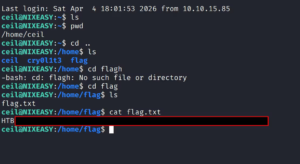
SSH is open, and since we have a credential we should just connect to it. SSH didn’t work, but there is also an FTP server. Able to connect but no files on the server for port 21, however port 2121 exposed ceil’s .ssh folder:
- rw-rw-r-- 1 ceil ceil 738 Nov 10 2021 authorized_keys
- -rw------- 1 ceil ceil 3381 Nov 10 2021 id_rsa
- -rw-r--r-- 1 ceil ceil 738 Nov 10 2021 id_rsa.pub
Medium Scenario
This second server is a server that everyone on the internal network has access to. In our discussion with our client, we pointed out that these servers are often one of the main targets for attackers and that this server should be added to the scope.
Our customer agreed to this and added this server to our scope. Here, too, the goal remains the same. We need to find out as much information as possible about this server and find ways to use it against the server itself. For the proof and protection of customer data, a user named HTB has been created. Accordingly, we need to obtain the credentials of this user as proof.\
Discovery
Nmap shows an RDP server, as well as potential SMB/NFS shares.
Export list for 10.129.202.41:
/TechSupport (everyone)
We discovered a TechSupport share. Let’s mount to it and explore
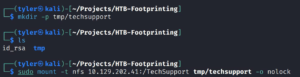
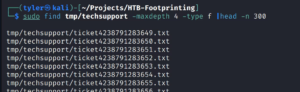
Most of these are empty, but looking at the size of the files shows one which has a non-zero size.

Findings
There is a tech support exchange but, more importantly, there is some service information here:
smtp {
    host=smtp.web.dev.inlanefreight.htb
    #port=25
    ssl=true
    user="alex"
    password="lol123!mD"
    from="alex.g@web.dev.inlanefreight.htb"
}

securesocial {
  onLoginGoTo=/
  onLogoutGoTo=/login
  ssl=false
  userpass {
    withUserNameSupport=false
    sendWelcomeEmail=true
    enableGravatarSupport=true
    signupSkipLogin=true
    tokenDuration=60
    tokenDeleteInterval=5
    minimumPasswordLength=8
    enableTokenJob=true
    hasher=bcrypt
  }
  cookie {
    # name=id
    # path=/login
    # domain="10.129.2.59:9500"
    httpOnly=true
    makeTransient=false
    absoluteTimeoutInMinutes=1440
    idleTimeoutInMinutes=1440
  }
}
This revealed exposed SMB credentials, where we were then able to connect to the SMB share. This share had one file, important.txt, with credentials for an sa user. “sa” is relevant as it implies this account may be an admin account for a Microsoft SQL instance.
I then tried spraying the credentials for both “alex” and “sa” around, and I actually found that the Administrator account used the sa password. I used evil-winrm to open a shell, but ultimately was unable to find anything useful initially.
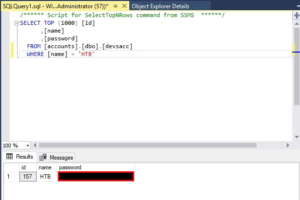
then went back to my nmap results and noticed an RDP port open, so I decided to RDP as Alex into the server. From there, I noticed a link to MS SQL Server Management Studio, where I was able to enter the SA credentials. Initially I couldn’t get the SQL Manager to accept the sa credentials, but running as Administrator got it to work instead. Sure enough, we were able to find the devaccs table and exfil the flag for this exercise.
Hard lab
Scenario:
The third server is an MX and management server for the internal network. Subsequently, this server has the function of a backup server for the internal accounts in the domain. Accordingly, a user named HTB was also created here, whose credentials we need to access.
Starting Nmap 7.98 ( https://nmap.org ) at 2026-04-04 17:01 -0400
Nmap scan report for 10.129.42.39
Host is up (0.015s latency).
Not shown: 65530 closed tcp ports (reset)
PORT     STATE SERVICE      VERSION
22/tcp   open  ssh          OpenSSH 8.2p1 Ubuntu 4ubuntu0.3 (Ubuntu Linux; protocol 2.0)
110/tcp  open  pop3         Dovecot pop3d
143/tcp  open  imap         Dovecot imapd (Ubuntu)
993/tcp  open  ssl/imap     Dovecot imapd (Ubuntu)
995/tcp  open  ssl/pop3     Dovecot pop3d
Service Info: OS: Linux; CPE: cpe:/o:linux:linux_kernel

Service detection performed. Please report any incorrect results at https://nmap.org/submit/ .
Nmap done: 1 IP address (1 host up) scanned in 35.99 seconds
I’m immediately drawn to the POP3 and IMAP resources; however without a credential we are unable to extract any other valuable information. I decide to initiate a UDP scan to see if there are any other services that might be useful, and we found an exposed SNMP service on port 161.
I then enumerated this using onesixtyone and found the community string called BACKUP.
Enumerating the community string led us to a set of credentials exposed in this community string; this might be what we need to access the IMAP and POP3 services.
IMAP → SSH key
From IMAP we got an SSH private key (truncated in this post):
-----BEGIN OPENSSH PRIVATE KEY-----
[REDACTED FOR PUBLIC POST]
-----END OPENSSH PRIVATE KEY-----
Connecting via SSH, we are able to connect to Tom’s account. While looking around, we find a SQL server on this machine. We are able to log on as Tom and find a users DB which has our flag.

Below you can find some summary reports I drafted up in a pentest-report esque fashion:
Penetration Test Report — InlaneFreight Easy Assessment
Target: 10.129.41.248
OS: Ubuntu Linux (OpenSSH 8.2p1)
Date: 2026-04-04
Scope
Authorized HTB CPTS lab target. Goal: enumerate exposed services, discover credentials, and identify attack paths.
Service Enumeration
| Port | Service | Version / Notes |
|------|---------|-----------------|
| 21/tcp | FTP | ProFTPD — banner: ftp.int.inlanefreight.htb |
| 22/tcp | SSH | OpenSSH 8.2p1 Ubuntu 4ubuntu0.2 |
| 53/tcp | DNS | ISC BIND 9.16.1 (Ubuntu) |
| 2121/tcp | FTP | ProFTPD — banner: Ceil's FTP |
Findings
Anonymous FTP Access on Port 2121 Exposes SSH Private Key
Affected asset: 10.129.41.248:2121 (ProFTPD — “Ceil’s FTP”)
Severity: Critical
Anonymous login to port 2121 revealed ceil's .ssh directory with full key material:

drwxr-xr-x  2 ceil ceil 4096 Nov 10 2021 .ssh

-rw-rw-r--  1 ceil ceil  738 Nov 10 2021 authorized_keys
-rw-------  1 ceil ceil 3381 Nov 10 2021 id_rsa
-rw-r--r--  1 ceil ceil  738 Nov 10 2021 id_rsa.pub

Downloaded id_rsa and used it to authenticate via SSH:

$ chmod 600 id_rsa
$ ssh -i id_rsa ceil@10.129.41.248
Attack path: Anonymous FTP (2121) → .ssh/id_rsa exfiltration → SSH as ceil → flag.
Remediation: Disable anonymous FTP; remove sensitive key material; rotate keys; restrict ProFTPD chroot.
FTP Server on Port 21 (No Data Exposed)
Connected to port 21 FTP but no files were present.
Credential Summary
ceil — SSH private key (id_rsa) — source: Anonymous FTP on port 2121
Status
Assessment complete. Full attack chain demonstrated and flag recovered.
Penetration Test Report — InlaneFreight Footprinting Assessment
Target: 10.129.42.22 (WINMEDIUM)
OS: Windows Server 2019
Date: 2026-04-04
Summary
This assessment focused on enumerating exposed services and discovering credential-based attack paths on WINMEDIUM.
Service Enumeration (high level)
| Port | Service |
|------|---------|
| 111/tcp | RPCbind (NFS) |
| 135/tcp | MS-RPC |
| 139/tcp | NetBIOS-SSN |
| 445/tcp | SMB (signing enabled but not required) |
| 2049/tcp | NFS |
| 3389/tcp | RDP |
| 5985/tcp | WinRM |
Findings
NFS Share Exported to Everyone
$ showmount -e 10.129.42.22
Export list for 10.129.42.22:
/TechSupport (everyone)
The share contained a support ticket with plaintext SMTP credentials.
Plaintext Credentials in Support Ticket
smtp {
    host=smtp.web.dev.inlanefreight.htb
    ssl=true
    user="alex"
    password="lol123!mD"
}
Using these credentials against SMB returned important.txt containing:
sa:87N1ns@slls83Impact
Unauthenticated NFS → credential discovery (alex) → SMB access → SA credentials → password reuse → Administrator takeover (RDP/WinRM) → MSSQL access → data exfiltration.
Remediation
- Restrict NFS exports to specific hosts/subnets.
- Rotate compromised credentials immediately.
- Enforce SMB signing and unique passwords; implement LAPS for local admin passwords.
- Remove credential files from shares and audit share contents.
Footprinting Assessment — InlaneFreight Ltd (10.129.2.59)
Date: 2026-04-05
Target: 10.129.2.59 (HARD)
Attack Chain Summary
Support Ticket (OSINT) → Leaked SMTP Creds (alex)
  ↓
SNMP Enumeration (community: backup) → Leaked credentials (tom)
  ↓
IMAP/POP3 → recovered OpenSSH private key → SSH (tom)
  ↓
SSH → local MySQL → flag in users DB
Findings
Credentials Exposed in Support Ticket
Support ticket contained plaintext SMTP credentials: alex:lol123!mD. Cookie domain references web app on 10.129.2.59:9500.
SNMP Community String Exposes Credentials
SNMPv2c community string backup exposed a credential for tom (evidence saved).
SSH Private Key via Email (IMAP/POP3)
Using the discovered credentials, we accessed Tom’s mailbox and recovered an OpenSSH private key (saved as finds/tom_id_rsa).
SSH Access and Local DB Flag
ssh -i finds/tom_id_rsa tom@10.129.2.59Authenticated to local database as tom and recovered the flag from the users database.
Recommendations
- Rotate all discovered credentials and enforce unique passwords.
- Disable SNMPv2c and migrate to SNMPv3 with auth+encryption; firewall UDP/161.
- Deploy DLP to prevent private key leakage via email; enforce key management policies.
- Restrict database access to service accounts and network segments.
Leave a Reply