The Problem: Studying Physics Is Hard When You Just Get Answers
I often find myself exploring subjects I find academically interesting even if they don’t have personal relevance to my own professional work. Problems, and their solutions, are a valuable asset, but you can often “spoil” yourself by looking at the solution too early. I wanted a way to bridge this divide by given hints based off the solutions while not giving the whole game away.
That’s why I built Physics AI Tutor — a web-based AI assistant that acts as a Socratic study partner. You feed it your textbook material and problem sets, ask it questions, and instead of handing you the answer, it guides you with hints and questions to help you reason through the problem yourself.
How It Works
The tutor is built around three core ideas:
- Your content, your curriculum. Upload your own textbook chapters, lecture notes, or problem sets as PDF or text files. The system extracts the text, splits it into chunks, and stores it in a local vector database for fast retrieval.
- Semantic search for relevant context. When you ask a question, the app uses sentence embeddings (via sentence-transformers) and FAISS to find the most relevant passages from your uploaded material. These are provided to the AI as reference — so its hints are grounded in what you’re actually studying.
- Socratic prompting. The AI is instructed to never reveal the full solution. Instead, it gives one hint at a time, asks guiding questions (“What forces are acting on the block?” or “What conservation law applies here?”), and gradually increases specificity if you’re stuck.
The Tech Stack
The project is a lightweight Python web app that runs locally on your machine:
- FastAPI — serves the web UI and handles file uploads and chat requests
- GPT-4o via GitHub Models — powers the tutoring conversation (free with a GitHub Copilot subscription). You could easily re-engineer it to use a model of your choosing.
- FAISS + sentence-transformers — local vector search for retrieving relevant textbook passages
- PyPDF — extracts text from uploaded PDF files
- MathJax — renders LaTeX equations in the browser so formulas display correctly
The entire app is self-contained — no external databases, no cloud storage. Your textbook content stays on your machine.
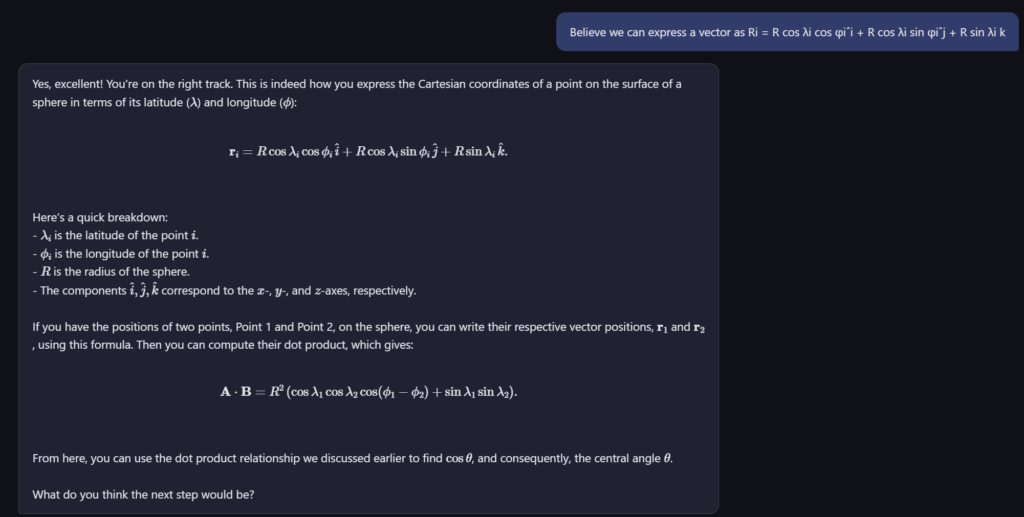
A Typical Study Session
Here’s what using it looks like in practice:
- Start the server and open
localhost:8000in your browser - Upload a chapter on electrostatics from your textbook PDF
- Type: “A point charge of +3μC is placed 0.5m from a -2μC charge. What is the force between them?”
- The tutor responds: “Good question! What law describes the force between two point charges? What quantities do you need?”
- You reply: “Coulomb’s law — I need the charges and the distance”
- The tutor: “Exactly! Now, can you write out Coulomb’s law and plug in the values? Remember to pay attention to the sign of the force — what does it tell you about the direction?”
The AI draws on the textbook passages you uploaded to make its hints specific and relevant, but it never just hands you the formula with numbers filled in.
Why Not Just Use ChatGPT?
You absolutely can ask ChatGPT physics questions. But there are two key differences with this approach:
- It’s tuned to teach, not answer. General-purpose chatbots default to giving complete solutions. This tutor is specifically prompted to hold back and make you think. It takes deliberate prompt engineering to maintain that behavior consistently across a conversation.
- It knows your textbook. By uploading your specific course material, the hints align with the notation, methods, and examples your chosen learning material uses — not some generic explanation from the internet.
Getting Started
The project is open source and runs locally with Python. You’ll need:
- Python 3.11+
- Programatic access to an LLM of your choosing (API key)
Setup takes about five minutes:
git clone <your-repo-url>
cd Physics-AI-Assist
python -m venv .venv
.venv\Scripts\activate
pip install -r requirements.txt
Add your GitHub/API token to a .env file, then run:
uvicorn app:app --reloadOpen http://localhost:8000 and start uploading your study materials.
What’s Next
This is a first version. Some ideas for future improvements:
- Problem tracking — log which problems you’ve worked through and how many hints you needed
- Diagram support — let the tutor generate or reference free-body diagrams and circuit schematics
- Quiz mode — have the tutor generate practice problems from your uploaded material
If you’re interested in taking a look, you can find this on my GitHub.